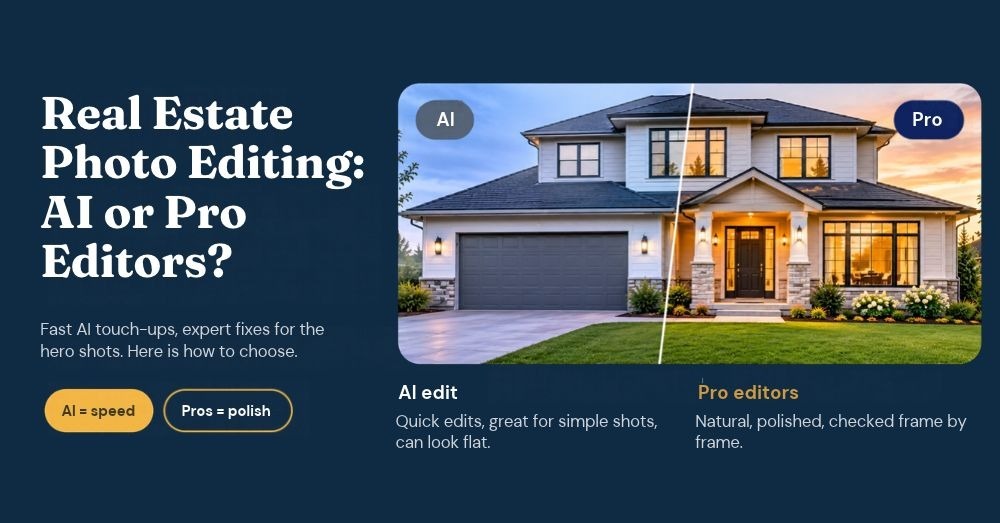
Real Estate Photo Editing Services: AI or Pro Editors?
First impressions matter a lot in real estate, and listing photos can definitely shape a buyer’s interest before they ever step inside a property. From bright interiors to clear exterior shots, well-edited images can make a property stand out and help potential buyers picture themselves in the space.
You should use professional editors when a listing needs to look polished and true to life, while AI tools should be used for fast, simple touch-ups. Pro editors handle the tricky fixes, like blown-out windows, twilight conversions, and clutter removal. AI handles speed and volume, so a mixed workflow often works best.
PicsMatic, a human-powered photo editing company, offers real estate photo editing services built for that gap.
What Are Real Estate Photo Editing Services?
In simple terms, real estate photo editing services provide post-production support for property photos, where editors fix exposure, color, and perspective. This helps ensure that the listing looks bright and accurate before it goes live.
The work usually covers:
- Color and exposure correction
- HDR blending of bracketed shots
- Perspective and vertical line correction
- Sky replacement and twilight conversion
- Object removal, such as cars or trash bins
- Virtual staging for empty rooms
What Professional Real Estate Photo Retouching Services Deliver
Professional real estate photo retouching services consistently deliver natural-looking images across the whole listing, rather than just giving you one hero shot. This is very important because even one dark or tilted frame can break the flow of buyers scrolling through a gallery.
A human editor carefully checks each image, matching white balance from room to room, balancing bright windows against dim interiors, and clearing distractions while keeping the home’s real features.
Real Estate Lightroom Presets: Where They Fit
Real estate Lightroom presets apply a saved set of adjustments, such as exposure, contrast, and white balance, in one click. They are perfect for giving a shoot a quick and consistent starting look, but presets have their limitations.
They move sliders, so they cannot remove a car from the driveway, replace a gray sky, or merge bracketed exposures. Lighting also changes from room to room, so a preset that suits the living room can wash out the bathroom.
Presets should be treated as a first pass because tougher photos need real estate photography editing that goes beyond just the sliders.
How to Choose the Best Real Estate Photo Editing Services?
Before closing a deal with a real estate photo editing service, it is essential to evaluate them on a few key factors that determine their quality and reliability. You should consider the following points when comparing your options:
- Samples: Ask for a free sample or a before-and-after portfolio.
- Turnaround: Confirm standard and rush delivery times.
- Consistency: Check whether the team can follow your editing style.
- Revisions: Ask how feedback and corrections work.
- Security: Confirm how property files are stored and transferred.
The best real estate photo editing services also cover HDR, sky replacement, object removal, and virtual staging in one place.
Which Platforms Are Best for Outsourcing Real Estate Photo Editing?
Several real estate photo editing services offer different approaches, from human-led professional editing to AI-powered enhancement tools. Here are some popular options worth considering:
If you plan to outsource real estate photo editing, run a small trial batch first. Real estate photo editing outsourcing works best when you can judge quality first.
How Can I Find the Best Real Estate Photo Editing Services Near Me?
Finding a reliable real estate photo editing service is not necessarily about choosing a provider in your area. Since most editing work is handled online, you can work with remote teams as long as they offer convenient communication, dependable delivery, and secure file sharing.
AI or Professional Editors: Which Should You Choose?
You should choose AI tools when you need speed or when working with simple shots, and professional editors when accuracy, polish, and tricky fixes are needed.
| Factor | AI Tools | Professional Editors |
|---|---|---|
| Speed | Often minutes | Usually hours to a day |
| Best for | Simple enhancements, high volume | Premium listings, complex fixes |
| Window pulls, twilight, object removal | Results can vary | Manual control for each image |
| Consistency across a listing | Can differ from photo to photo | Reviewed by a person, frame by frame |
| Judgment calls | Follows preset rules | Weighs realism and context |
| Risk of an unnatural look | Higher without review | Lower with human quality checks |
The hybrid approach is the best way to go; you can run quick edits through AI or presets, and send hero images, twilight shots, and luxury listings to professional editors.
Conclusion
You can benefit from real estate photo editing only when images are accurately processed and professionally presented. Whether you choose AI tools or professional editors, the goal should be to create clear, natural-looking property photos that attract potential buyers. A reliable real estate photo editing service can help maintain consistent image quality across your listings.
FAQs
1. Can AI replace professional real estate photo editors?
AI handles routine edits quickly, such as brightening and straightening. Complex jobs, like blending difficult lighting or removing distractions, still benefit from human judgment.
2. How long does professional real estate photo editing take?
Turnaround depends on the volume and the edits requested. PicsMatic typically delivers within 12 to 24 hours, and larger projects can be scheduled in batches.
3. Are Lightroom presets enough for listing photos?
Presets work for a consistent base look, but they cannot remove objects, replace skies, or blend exposures. Use them for a first pass, then send photos that need complex fixes to editors.
4. Is real estate photo editing misleading to buyers?
Not when done responsibly; editing should improve light, color, and clarity without changing the property itself.
5. What should I send to an editing team?
Send bracketed shots or RAW files if you have them, plus a short-sized note and reference images.